Search is a fundamental feature for documentation projects,
helping users to find the information they need quickly.
That's why Read the Docs includes a powerful search engine for all hosted projects powered by Elasticsearch.
Since its launch, we have continuously worked to enhance the search experience by adding new features,
but performance has remained a challenge due to the growing number of projects and users on the platform.
Over the last few months, we have focused on improving search performance for all projects,
achieving significant gains in speed and responsiveness.
We reduced the average response time from 210ms to 97ms on Read the Docs Community,
and from 570ms to 205ms on Read the Docs Business (excluding network latency).
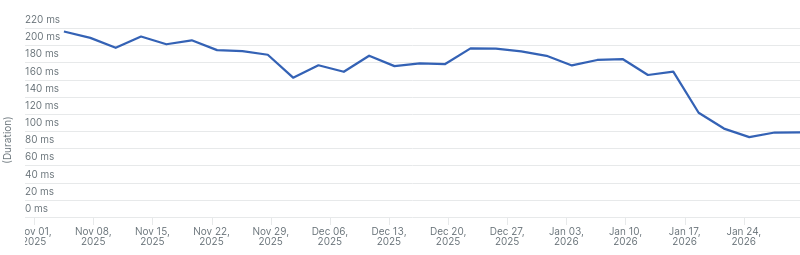
Average response time for search requests on Read the Docs Community from the last 3 months.
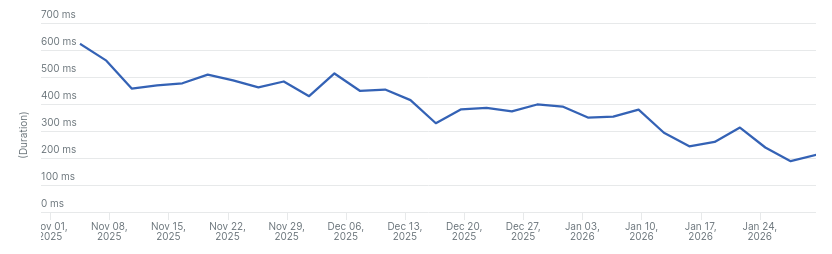
Average response time for search requests on Read the Docs Business from the last 3 months.
What we did
When looking for ways to improve search performance,
we identified three main areas of focus:
- Reducing the volume of data being searched.
- Optimizing Elasticsearch configuration and queries.
- Optimizing our application logic.
Reducing the volume of data
The more data we search through, the longer it takes to return results.
It also impacts our infrastructure costs; Elastic Cloud requires upgrading the instance type (adding CPU and RAM) to increase storage.
We were approaching 85% of our current plan's storage limit.
We started by removing projects marked as spam from our index,
followed by inactive projects (those with no builds or searches in the last 90 days).
While this didn't yield a massive performance boost immediately,
it kept us within our storage limits without an emergency plan upgrade
and prepared the index for our next step: increasing the number of shards.
Optimizing Elasticsearch queries
We analyzed our queries for inefficiencies and found several opportunities for improvement:
- Result limits: We were returning 50 results by default,
but most users rarely look past the first few.
We reduced the default count to 15.
- Fuzzy search: Some search terms containing
~ (like shell prompts or UNIX paths)
were triggering expensive fuzzy searches unintentionally.
We changed the maximum number of expansions from 50 to 10 and increased the prefix length from 0 to 1.
See the Elasticsearch documentation for more information about these parameters.
Optimizing Elasticsearch configuration
As we exhausted query-level optimizations,
we found a couple of alerts from Elastic Cloud's AutoOps regarding shard size.
We had a single shard for the entire index.
As the index grew to 630GB, performance degraded.
Elasticsearch thrives on parallelizing requests across multiple shards;
the recommended size is around 30GB per shard.
When Elasticsearch was first integrated into Read the Docs, our index was much smaller,
so a single shard made sense at the time.
Because the number of shards cannot be changed on an existing index, we performed a full re-index.
To ensure minimal downtime during the process, we followed these steps:
- Cleanup: Deleted unnecessary data to minimize the transfer.
- Scaling: Temporarily upgraded instances to handle the storage of both indexes and speed up the migration.
- Re-indexing: Created a new index with 20 shards (based on the ~570GB post-cleanup size)
and used the reindex API to migrate data.
- Cutover: Updated our index alias and deleted the old index.
- Catch-up: Indexed any new or updated documents added during re-indexing.
The process took a couple of hours, and search remained available during the whole time.
This improved Elasticsearch query averages from 90ms to 60ms on Community and 80ms to 60ms on Business.
It also significantly sped up document indexing and deletions.
Note: For Read the Docs Business, our index was smaller (around 100GB),
but we still needed to increase the number of shards to improve performance,
so we created a new index with 4 shards.
Optimizing application logic
We discovered that significant time was spent querying the database to serialize results (fetching project details, resolving URLs),
and on Read the Docs Business performing permission checks.
This got worse as we enabled searching for subprojects by default,
as searching on projects with many subprojects triggered multiple database queries per search.
We resolved several N+1 issues using select_related and prefetch_related,
implemented caching where possible, re-used previously fetched data/instances, and did operations in bulk.
This saved approximately 12ms on Community and 105ms on Business.
Optimizing the Elasticsearch client
Years ago, we disabled connection pooling in the Python client due to stability issues,
this resulted in creating a new connection for each request.
We revisited this, and enabled connection pooling without issues.
We also used the recommended way to connect to Elastic Cloud using the cloud_id parameter,
this enables HTTP compression and other optimizations.
Elasticsearch query times dropped from 60ms to 25ms on Community and 60ms to 40ms on Business.
Note: The difference in improvement between Community and Business is likely due to the difference in the instance types used in each platform.
On Community, we use more powerful instances due to the higher storage needs.
Conclusions
After implementing these changes, we saw a significant improvement in search performance across all projects hosted on Read the Docs.
Search as you type is now much more responsive, especially on Community. We still have work to do on Business,
but we are happy with the progress we have made so far.
You can see the improvements in the graphs below.
There are three main drops in the graphs that correspond to the main changes we made:
- The first drop corresponds to the optimizations made to our Elasticsearch queries.
- The second drop corresponds to the increase in the number of shards.
- The third drop corresponds to the change in our Elasticsearch client to use connection pooling.
Of course, there are other optimizations that contributed to the overall improvement that were included in the same time frame,
but these were the most significant ones regarding Elasticsearch performance.
Average response time for search requests on Read the Docs Community from the last 3 months.
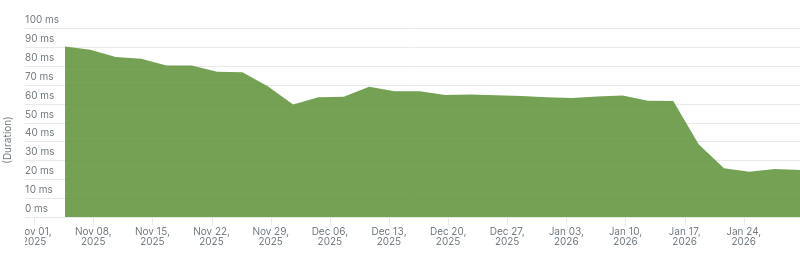
Average Elasticsearch query time on Read the Docs Community from the last 3 months.
Average response time for search requests on Read the Docs Business from the last 3 months.
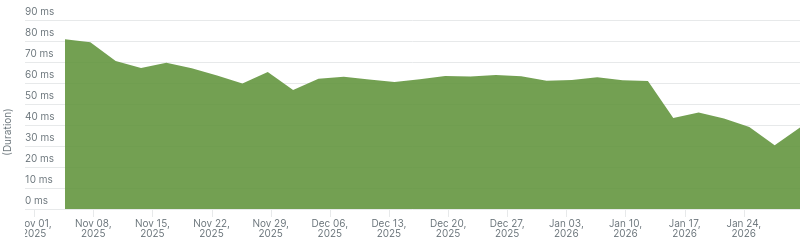
Average Elasticsearch query time on Read the Docs Business from the last 3 months.
Some reasons why Read the Docs Business is still slower than Read the Docs Community:
- More complex permission checks.
Since we host private projects, we need to ensure that users only see results from versions they have access to.
This requires checking each version's permissions before including it in the search results.
- No caching of search results.
Due to the nature of private projects, we can't cache search results,
as they may change based on user permissions.
Recommendations
Here are some recommendations for other teams looking to improve their Elasticsearch search performance:
- Monitor shard size and number of documents per shard.
As your index grows, it's important to ensure that shards don't become too large.
- If you are using Elastic Cloud, check AutoOps alerts regularly.
You can setup email/slack notifications for new alerts.
- Delete unnecessary data from your index.
This will help reduce storage costs and further reduce your number of shards needed.
- Make sure your Elasticsearch client is using connection pooling and other optimizations.
- Implement restrictions on the number of results returned by default, and the use of expensive search features like fuzzy search.
- Check for optimizations in your application logic, if it interacts with the results from Elasticsearch.
Next steps
While we are happy with the improvements we have made so far, there is still room for further optimizations:
- Revisit the number of shards.
We decided on the number of shards based on the size of the index before re-indexing,
but the resulting index was smaller than we expected (there was maybe some fragmentation on the old index).
Reducing the number of shards could improve performance, but it's not clear by how much.
As this requires re-indexing again, we won't do this unless we need to re-index for other reasons.
- Further optimize database queries.
This is an ongoing effort, and we will continue to look for ways to reduce the number of queries and improve their efficiency,
especially on Read the Docs Business, where we run these queries everywhere a resource is accessed.
Acknowledgements
Elastic sponsors Read the Docs Community with a free Elastic Cloud plan.
We are grateful for their support in helping us provide search functionality to all our users,
their support is key to keeping search fast and accessible for the whole community.
Changes
If you are interested in the specific changes we made,
here is the list of relevant pull requests.
Note that some changes were made in private repositories,
so they are not included here.